

Showing posts with label Christmas Planning. Show all posts

Last year we took our first family trip to Disney World, and we had a ball.  While I was doing research and planning our trip, I discovered an amazing website called WDW Prep School.  If you're planning a trip to Walt Disney World, I would HIGHLY recommend you visit her site.  One of my favorite things on her site is a post about her Disney World Binder, which also has links to tons of downloads that you can use to make your own Disney Binder.  So being a binder fan, I started my own Disney Binder and revisited that post many times to help find what I needed to plan our trip.  I loved the post so much that it started me thinking that I would love to be able to offer a resource like that for Christmas Binders.  Which brings us here!

I have long been a fan of Christmas Binders.  Whether your Christmas preparations are on a grand scale or a simple one, a Christmas Binder can help you keep track of everything.  The beauty of the Christmas Binder is that they are totally customizable to every situation.  Maybe you just need a place to keep track of your gift giving, Christmas card lists, and recipes.  Or maybe you want a place to keep all those magazine clippings and printed out photos from the Internet to help inspire your decorating.  Whatever it is that you want to keep track of, a Christmas binder is a great way to do it.

I started my own Christmas Binder several years ago, and I use it every year.  My binder has up until recently been divided into the following sections:
I've decided that it is high time I replaced my sad old plain Christmas binder with a new fancy one.  I've spent a lot of time looking at the binders on Zazzle-- there are thousands-- and so far, these are the ones I like the most.


TWO binders, you say?  Have you gone off the deep end?

Maybe.

But I can tell you that I would love having a binder dedicated to holiday recipes.  I plan to use it for both Thanksgiving and Christmas (which is why it's called Holiday Recipes, and not Christmas Recipes).  I am dividing the recipes into sections like a cookbook-- appetizers, breakfast, main course, sides, desserts, etc.  And I have made an agreement with myself only to include the recipes that are tried and true family favorites.  This is not the place to keep those clipped, untried recipes out of a magazine.  Just the favorites.

Now I can expand the information in my other binder to include more planning and decorating information.  This is important, especially because I tend to forget from one year to the next what I did that worked and what I did that didn't work.  Having a place to keep photos and notes from year to year saves lots of trouble.

If you want to start your own Christmas binder, or even if you already have one started, then I hope you'll find something useful in this list of downloads.  My main criteria for choosing which links to include was that they be free, and that they be useful.  Most of them are variations on a theme, but hopefully you can find one in each section with a design you like.  Be sure to check out the links in the Planning Page Collections section, because they each have multiple downloads.  Happy planning!

Planning Page Collections:
(These are links to sites that have created sets of planning pages for you to download.  Most of these include recipe/meal planning pages, gift lists, Christmas card lists, and calendars.)  
Decorations and Decorating:
Gifts:
Budget:
Christmas Cards/Newsletters:
Other helpful planning pages:
Advent:
Thanksgiving:
See more Christmas themed binders at Zazzle.com

Browse other gifts from Zazzle.
(Note: If you use my referral link Zazzle will pay me a referral fee.)


This year I joined the masses and got an iPhone and an iPad.  That's right folks, up until this year my cell phone only made calls and sent texts.  Can you imagine?  How did I survive?

Well actually, I've had an iPod Touch for the last few years which accomplished the things that my basic cell phone didn't.  But it is a lot more convenient to not have to carry two devices around.

The last couple of years I've used an app called Santa's Bag to keep track of my Christmas gift lists.  And I was pleased with it, although they did a big update last year that changed the way the interface looked and I didn't love it as much.  It was more cluttered looking to me.

So this year I decided to try out several different Christmas list apps and see which one I liked best.  I tried six new apps, that range in price from free to $1.99.  Since I have an iPad, I was also interested in seeing which ones work on both platforms. Here's how they shake out!


Cost: Free
Compatible with: iPhone, iPad, and iPod Touch
My rating: 1 out of 5

Features:
  • Create a list for each recipient
  • List the name of each gift you plan to buy and the price.
  • Cross off the items as they're bought.
Features Unique to this App:
  • None
Drawbacks:
  • Very little functionality
  • Lots of annoying ads
  • No password option
Summary:

This is basically a list making app with a Christmas tree on it.  The description on iTunes promises that there's a big update coming with a lot of new features.  I may update this review once that's released, but as of now I don't recommend downloading this app, even for free.

***************************************


Cost: $0.99
Compatible with: iPhone, iPad, and iPod Touch
My rating: 2 out of 5
Features:
  • Enter gift information along with the recipient's name and their relationship to you.
  • Set individual budgets for each person on your list.
  • Keep information on each gift including a description, price, and store.
  • Mark each gift with a checkmark as it is bought.
  • Sort gifts by store.
  • Create an account and manually sync information across devices.
  • Password protected
Features Unique to this App:
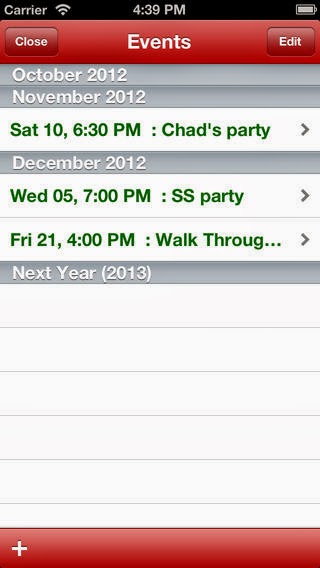
  • Also includes a calendar function so that you can enter events, dates, times, locations and description.
Drawbacks:
  • Does not have the ability to upload pictures of your recipients or of gifts.
  • There is no group function as is common with other gift apps.  This means every recipient on your list is grouped together alphabetically, which makes it more difficult to navigate.
  • No archive function
  • Can't assign gifts to multiple recipients
  • No way to edit recipients' names, and the app comes loaded with several "example" names that you can only get rid of if you mass delete everything.
Summary:

This is such a basic app that I really believe it should be free.  It would make more sense to offer this level of functionality in a free app, with the option to upgrade to a pro version for more features.  However, I do like the inclusion of a calendar function.

***************************************


Better Christmas List
Cost: $1.99
Compatible with: iPhone and iPod Touch
My rating: 3 out of 5

Features:
  • Countdown at the top of the screen tells you how many days left until Christmas
  • Enter a photo for each recipient, and assign them to custom groups
  • You can set budgets either by group or by individual recipient
  • Enter a photo for each gift, the price, and the store where you plan to (or already have) purchased it
  • A progress bar on each gift allows you to select an empty shopping cart to signify "need to buy," a full shopping cart for "bought," a gift for "wrapped," and a package for "shipped."
  • Password protected
  • Archive and export data
Features Unique to this App:
  • A stocking next to each recipient "fills up" as you purchase gifts, which is cute.
Drawbacks:
  • You can't assign the same gift to multiple people
  • Views are very basic compared to other paid apps
Summary:

This app is basically good, but lacks the kind of features you would expect for a paid app.  The other $1.99 app that I reviewed (see below) is a much better bang for the buck.


***************************************


Cost: $0.99
Compatible with: iPhone, iPad, and iPod Touch
My rating: 4 out of 5

Features: 
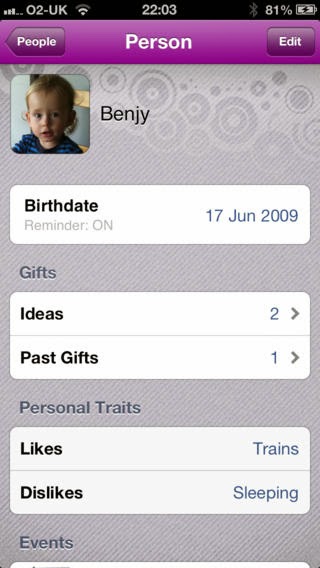
  • Personalize everyone on your list with their picture and their birthday.
  • Set individual budgets for each person on your list.
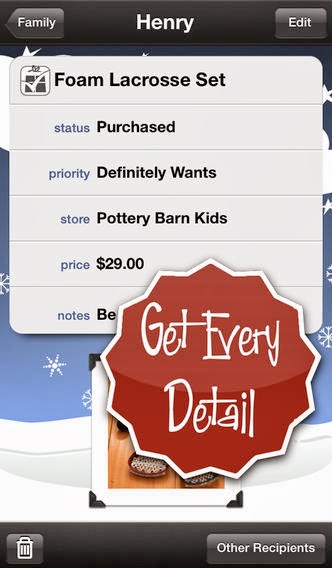
  • Keep information on each gift including a description, price, store, notes, and a picture.
  • Keep track of the status of each gift under the recipient's profile- you can file them under "need," "purchased," "wrapped," and "shipped."
  • You can also keep an idea file for each recipient and archive gifts once the year is over.
  • Sync data to iCloud and it will transfer your information across your devices instantly.
  • Password protected
Features Unique to this App:
  • You can create events to keep track of gift giving year-round-- birthdays, anniversaries, and other holidays.
Drawbacks:
  • Interface is clean and functional, but not very festive.
  • You can't assign the same gift to multiple people.  So basically, if you are buying the same item for several teachers on your list, you will have to enter that information multiple times.
Summary:

While this app is functional, it didn't really wow me.  The interface is so plain that it makes it less fun to enter all my gift information.  However, I do like that you can sync your information across devices so that you can access it from both your phone and iPad.

***************************************


* Best Free App *


No More Socks: The Christmas List Genius
Cost: Free, or $2.99 to upgrade to add-free
Compatible with: iPhone and iPod Touch
My rating: 4 out of 5

Features: 
  • Personalize everyone on your list with their picture and their birthday.
  • Set individual budgets for each person on your list.
  • Keep information on each gift including a description, price, store, notes, and a picture.
  • Keep track of the status of each gift under the recipient's profile-- put a checkmark next to "purchased."
  • You can also keep an idea file for each recipient and a general idea file.
  • Password protected
Features Unique to this App:
  • You can actually search stores from inside the app to find the best prices and bookmark each site.  This is an incredibly helpful feature!
Drawbacks:
  • You can't assign recipients to groups, although you can accomplish the same thing by creating different "events" for each group of recipients.
  • This is an app that is meant to be used year-round, so it's not really Christmas-y looking.
Summary:

For a free app, this has a great deal of functionality.  I love the search-within-the-app feature.  I wish it had a Christmas-y color scheme, but it's free so I can't complain. 

***************************************


* Best Paid App *


The Christmas List
Cost: $1.99
Compatible with: iPhone and iPod Touch
My rating: 5 out of 5

Features: 
  • Enter a photo and budget for each recipient, and assign them to custom groups
  • See each group's total budget and number of gifts bought/to buy
  • Enter gifts one at a time or quick add many gifts at once
  • Enter a photo and the cost of each gift, along with the store where you plan to buy it-- the app comes already loaded with many popular stores to choose from, or you can enter your own
  • Email your lists directly from the app
  • Keep track of the status of each gift by marking it "to do," "purchased," "wrapped," "shipped," or "received."
  • Assign a gift to multiple recipients (great for teacher gifts or when you buy the same thing for multiple people!)
  • Archive data after Christmas is over
  • Password protected
Features Unique to this App:
  • Quick add feature lets you enter many gifts at once
  • Assign an importance to each gift by selecting "maybe," "definitely wants," or "must have"
  • View gifts to be purchased by store for easier shopping
  • See your progress at a glance (with a pie chart!) 
  • You can select the background from a variety of options
Drawbacks:
  • The iTunes store says it is compatible with iPad, but it would not download on mine.  I would love to have this on my iPad!
Summary:

This app has pretty much everything I could ask for in a Christmas gift app.  It has amazing functionality, especially for budgeting.  The app itself is visually appealing and easy to navigate.  When I started trying out all the apps, I entered the same information into each app so that I could get a feel for each one.  It was so easy to use this app that almost before I even realized what was happening I started using it almost exclusively.  I highly recommend this app if you're looking for an easy and effective way to keep track of your gift-giving this Christmas season!


***************************************
    Is everyone having a lovely Fall?  It's been flying by for me.  I've been quite busy, which is why I haven't been able to keep up with the blog.  I've had the wonderful experience of being a part of my sister's wedding last week.  The last few months have been a whirlwind of last minute preparations, planning a shower, and all the other fun joyful stuff that accompanies a wedding.  It's been great, but now I'm ready to dive back in and start talking about Christmas!  I can assure you that I've been thinking about it quite a bit!

    On our way home from the wedding last Saturday I started making Christmas gift lists.  Now, you all know that I dearly love my  Christmas binder.  It is the best way to stay organized and keep track of everything you need to do for the holidays.  But what happens if, say, you're out shopping, you don't have your binder with you, and you can't remember if you've bought a certain gift yet?  Or perhaps you're traveling back from your sister's wedding in Charleston, you don't have your binder handy, and you want to start making Christmas gift lists?  (Hypothetically.)

    That's where Santa's Bag comes in.  I downloaded the Santa's Bag app last year and while I didn't use it to its full potential then, I think this year it is going to be a very important tool for me.  Let me show you how it works.  (I grabbed this image off the Santa's Bag website.  Dear Santa's Bag people, I hope that's okay.  I really like your app.  Are we cool?)


    When you open the app, the first thing you see is this screen.  It tells you how many days are left until Christmas and an overview of your budget.  I feel sorry for this person who has $700 worth of gifts to buy and only eight days left until Christmas.  That's why it's important to plan ahead, folks!  Procrastination is the enemy of Christmas joy. 


    This is the recipients screen.  You can view it several different ways-- by name alphabetically, by group, or by status.  I really like to view by group.  You can create your own custom groups.  I have groups for the different branches of my family and a group for teachers.


    Then, you can view each recipient in their own profile screen.  Here is where you keep lists of what you plan to buy, sizes, budgets, and notes.  When you enter a gift, you can also enter what store you plan to buy it from and how much it costs.  Then you can sort gifts by store to see what all you need to buy from each place.  Once you finish buying for each recipient, you can mark them as complete.  Handy!

    You can password protect the app to keep prying eyes away from your lists.  That's one thing that's hard to do with a binder!  If any of you can figure out how to password protect your binder, I'd like to hear about it.

    When I bought the app last year I went ahead and created recipient profiles and groups for all of our family members.  So this year, all I had to do was archive the gifts I entered last year (again, handy) and start new lists.

    The only drawback to this app is that it appears to be only available to Apple users (iPhone, iPad, and iPod Touch).  But if you're an Apple user, I think you'll find this app indispensable to your Christmas gift planning!

    This is an unsolicited review-- I bought this app with my very own money and ClayPot Software has no idea who I am.  I just liked it and wanted to share!


    Planning ahead for Christmas has always been a hit-or-miss thing for me.  This year, I'm falling squarely into the "miss" category.  I have done very little shopping.  In fact, I don't even know what I'm buying anybody.  (Trying to figure out what to get for our kids-- that's a whole other post!).

    So I've been feeling a little bad about my lack of planning and even a little panicked, truth be told.  Which is why I was really happy to see that Cozi has their Christmas Countdown available to download to your Cozi calendar.


    If you don't have a Cozi calendar... well, whyever not?  They're free.  They're useful.  You can customize them with different agendas for the different members of your family.  You can make to-do lists.  You can make shopping lists.  You can import calendars from other services into your Cozi calendar.  You can even have Cozi send you text messages to remind you of appointments, if you want.

    And you can have it help you with your Christmas planning.  The Cozi Christmas Countdown starts next week with making gift recipient and idea lists.  Which is just what I need to do.

    I also enjoy browsing around the Cozi blog, because it is packed with useful information.  The motto of Cozi is to "live simply," and they provide a lot of tools and information to help you do just that.  Doesn't that sound great?  Living simply?  It sounds great to me right about now.

    Just so you know, this is my unsolicited opinion about Cozi.  They don't know me apart from the fact that I have a Cozi account.  They didn't ask me for a review.  I just thought I'd share about their service because I use it myself and I think it's swell.

    Back in August when I reviewed several of the different Christmas organizing systems that are available online, I personally chose to follow the Christmas Organizing Express plan this year.  One of the things that appealed to me about it was the concept of creating a Christmas organizing center, where I could keep everything I need to do my holiday preparations. 

    Of course, it took me forever to settle on how and where I was going to do it.  What I finally realized is that I already had a center, but never use it.  My desk.  Now, we're all friends, right?  Good.  I feel like I can share with you that my desk was beyond disorganized.  It was a clutter farm.  Here's the before picture.


    Most of the paper clutter is made up of school papers from my oldest daughter.  If you've got kids in school, can we just marvel together at the sheer amount of paper that they bring home on a weekly basis?  It's astounding.  And I have a hard time knowing what I should keep and what I should let go.

    So, what I did was I got out a trash bag (a kitchen-sized one) and I started sorting.  I started with just the surface of my desk.  I did end up keeping some of it, but the majority of it went into the trash, or as we used to say during my years working at the florist, "File 13."  As in, "Where should I put this?"  "Just put that in File 13."

    After the paper was gone, I got a good look at what was left.


    See?  It looks better already.  If I wasn't trying to create a Christmas organizing center then I would have left this alone.  But since I wanted to give it a little Christmas vibe, I knew I had to add something.

    It just so happens that I bought an 11"x17" White Christmas movie poster about ten years ago.  I never framed it, so it stayed in its protective cover in the closet for years.  I also had an LP of my favorite Christmas album, Evening in December, that my brother gave me several years ago.  I decided that I would frame them and hang them over my desk, because those are two of my favorite Christmas traditions.  (As you'll see in the little sidebar on the right.) 

    I was fortunate that Michael's was running a frame sale-- the frames were 40% off, and I had a coupon to take an additional 25% off of that.  So I bought two frames for about $10.  I also went to Target and bought a seagrass bulletin board.  I put a couple of scented candles on my desk-- Spiced Cider and Leaves from Bath and Body Works.  And voila!  My Christmas organizing center is done.


    On the left is my Christmas binder, and on the right are the Christmas magazines and catalogs that I've bought.  I don't have anything stuck to the bulletin board yet, but that's okay.  I'm not going to stick stuff up there just for the sake of doing it.  When something is board-worthy, I'll know.

    (By the way, the monitor on the left is not hooked up to anything.  We need to buy a new tower for it.  Just in case you were wondering why I had a monitor and a laptop on my desk.)
    Let's talk a little bit about planning for holiday cooking.  Everybody cooks more during Thanksgiving and Christmas, and frankly a lot of traditional holiday ingredients can be really expensive (pecans, anyone?).  Not only that, but how many of you are like me and have waited until the day before Thanksgiving to go grocery shopping?  That's got to be the most stressful day of the year to be in a grocery store.  Not only is it extremely crowded, but chances are they'll be out of whatever it was that you needed to buy!  So I wanted to share some of the things I've learned over the past few years that have helped to take some of the sting out of holiday grocery shopping.

    Plan Ahead
    One of the things I've learned from the FLYLady is to make a shopping list of the things that you know you'll be making over the holidays, and then each week when you do your normal grocery store trip (or trips, as the case may be), pick up one or two things off the list.  This applies to both non-perishables and perishables as long as they are freezable.  Oh, and put that holiday shopping list in your binder!

    I've also been a member of The Grocery Game for the past several years.  If you're not familiar with The Grocery Game, here's how it works:  you buy a subscription to their website and choose which grocery store you want to "play" with.  Each week, the website publishes a list of that grocery store's specials (advertised and non-advertised), and cross-references them with the coupons from the Sunday paper.  The list is color-coded so that you can see which specials save you the most.  It requires a little time investment to peruse the list and cut out all your coupons, but the savings are definitely worth it.

    One of the most important things I've learned from being a member of The Grocery Game is the concept of stockpiling.  Basically, this means when an item that you know you will use is on sale, go ahead and buy it-- even if you don't need it yet.  By buying it now at a discount, you save yourself money because you won't have to buy it for full price in the future.  This concept applies very well to holiday grocery shopping.  If an item from your holiday shopping list goes on sale, buy it!  I've already bought the pie crusts I will need for this year's pies, and I bought them on sale with a coupon.

    Do Your Homework
    For the higher priced items that don't generally go on sale, I will go to Sam's.  You can buy a two pound bag of pecans for about $12 at my local Sam's Club.  That's a great bargain.  I also buy spices and some of my canned goods there.  But I've found that if I can wait for a sale at the grocery store (especially when there's a coupon), I'll spend less there for most items than I would at Sam's. 

    This brings me to another point-- which is comparison shopping within reason.  I know that there are folks who search all the grocery store sale papers every week to find the cheapest deals, and then make trips to several different grocery stores in order to get the lowest prices.  Here's why I don't do that: for one thing, you can only use a coupon once.  When I was first a member of The Grocery Game, I signed up for two different stores.  The problem was that once I used a coupon for one store, inevitably the same item would go on sale at the other store within a couple of weeks.  So I found that, overall, if you're taking advantage of the sales when they happen and keep a reasonable stockpile, it won't be necessary to run all over Creation just to get a cheaper can of green beans.

    The other reason I don't do that is time and gas money.  Could I save fifty cents on heavy cream if I bought it at Trader Joe's?  Sure.  But if I have to make a special trip to Trader Joe's just for the heavy cream, then is that fifty cents worth the gas burned and time out of my day?  Probably not.  With that in mind, it would be a good idea to break down your holiday shopping list so that you know which items you want to buy at which store.  That way, when you make a trip to each store, you know you're getting the items you need a the best price.

    I realize that this is a lot to throw out all at once, so I'll stop here.  I'll just say this-- make sure that your holiday budget works for you.  These are things that have worked for me, but they may not work for you.  So keep that in mind.  But you'll find that once you've planned ahead and used a budget, it will alleviate so much of your stress that you'll look forward to doing it again!
    For those of you who are still interested in following a Christmas planner this year, it's not too late!  FLYLady's Holiday Cruise starts today!  You can find out more information on FLYLady's website.  FLYLady announced last week that she's been working on new videos that will debut in November, so that should be fun!

    Also, the Christmas Organizing Express started officially last week.  If you'd like to join me as I follow it, you're not too late!  The tasks assigned for the first week were to establish a Christmas Planning Center, gather your binder (or create one, if you've never used one before), and begin putting together a Christmas calendar.  There was also a journaling assignment.  Personally, I'm still trying to figure out the best way to put together my planning center.  When I get it done I'll take a picture and post it for you.

    Last but not least, the Christmas Countdown begins next Sunday, October 24th.  If you haven't checked it out recently, the Organized Christmas website has been redesigned and looks very slick!  Be sure to check it out.
    My sister asked me to share some ideas for gift alternatives.  In her words, "Not just sheep in Guatemala, but other alternatives."

    Alternative gift-giving can be a scary prospect.  Beware that it will often involve a lot of work and planning, but the payoff can be wonderful.  A few years ago, I got a gift from my Mom and my brother that was just perfect for me.  They found a copy of my favorite Christmas album, Evening in December (see the little picture there on the right?), in the original vinyl.  Along with the album, they had a photo from First Call autographed personally for me.  How fantastic was that?  A few years before that, my Mom was able to get Paula Deen to autograph one of her cookbooks for me.  That's something I'll always treasure.

    Here are a few ideas that I've gathered from around the web.  Some of these I've actually done myself!

    Create a Family Cookbook
    Put your family's favorite recipes in a cookbook.  The great thing about this idea is that it can be as simple or as elaborate as you'd like.  You can buy a recipe binder (Zazzle.com has a lot of really cute ones) and print out the recipes on decorative papers.  Or you could use a site like Blurb.com, Shutterfly, or Heritage Cookbooks to print your book.  (Just make sure you check to see what the minimum book order is first.)  I think it would be great to include photos of the family around the holidays from throughout the years. 

    Make a Personalized Calendar
    This is an especially great gift for grandparents-- make a calendar with photos of all the grandbabies!  Sites like Shutterfly and Snapfish make this very easy.  You can even customize the calendar by putting in dates for family birthdays and anniversaries.

    Books
    I found this idea on RethinkingChristmas.com and I think it's fabulous.  If you have a book lover in your life, ask a few people whom they respect or admire to give you a list of their five favorite books, along with a little note about why they chose each one.  Then, try to find the books in a used bookstore (or you could do it online through half.com).  Include the notes with each book along with the name of the person who recommended it.

    Share a Skill
    Do you have a friend who's always envied your ability to knit?  Bake?  Tie a bow?  Give them some lessons and gift them with the ability to do something they've always wanted to do!

    Music
    Make a CD of your favorite music to give out to your friends.  It could be a mix from your favorite decade, favorite bands, or just some of your favorite songs.  It's up to you!

    I found a few links around the web with lots of great ideas for gift alternatives.  Check out these sites:
    If you have any other ideas for alternative gifts, please leave them in the comments!
    Deal alert: if you have a child in your life who loves Thomas the Train, AC Moore has all their Thomas stuff buy one get one free this week!  This would be a great time to do a little Christmas shopping!  They also have "Let's Go Thomas," which is an interactive talking toy, on sale for $19.99-- regular price is $69.99!

    Also, there was a special coupon circular in Sunday's paper with lots of toy coupons in it.  If you missed it, you can print the coupons from playsaver.com.  The Toys R Us circular from this Sunday matches up the Play Saver coupons with some of their in-store deals-- you can view their circular on their website.  There are lots of great deals there, so check it out!

    Speaking of finding deals, I've had a couple folks ask me about doing Christmas on a budget.  I know that's a topic that affects a lot of folks right now, so I'm happy to say that I'm working on several posts on the subject.  I've got several things in the works that I'm very excited about.  So stay tuned for that!
    I found a great link that I wanted to share with you-- http://christmasplanner.com/.  This is actually a sister website to Organized Christmas.  The difference is that the Christmas Planner website focuses totally on creating your own Christmas planner.  Whether you're using a binder or you're one of those crafty people who makes your own books, there are useful links for you.


    If you're still getting started with Christmas Planning, there are articles on how to put together your planner.  There's also a section with links to other people's Christmas planners to give you some ideas and inspiration.  Of course, I'm a binder girl, so the Christmas printables section makes me dance a little jig.

    The site is a little advertisement-heavy which made it slow to load for me, but it's pretty well laid out and is easy to navigate.

    Enjoy!
    I'm something of a perfectionist.  It's not a good trait.  Reason being that I tend to put projects off if I don't feel like I have the time, materials, etc. to do them the right way.

    Which is why I've been struggling with the recipe section of my Christmas binder for years.  Because, you see, it's not good enough to simply have the recipes written on paper and put in the binder.  Oh, no.  They have to be printed out.  With clip art.  And decorative fonts, possibly in festive colors.  It's become a stumbling block to actually getting the binder done, which is ostensibly the goal of having a binder in the first place.

    But a few weeks ago, I had an epiphany-- why not buy decorative paper and print the recipes on that?  That way, I don't have to worry about clip art and coordination, I can just focus on making sure that my recipes are typed up (and accurate, which is important).  So I took myself to AC Moore and found this paper:


    I was pretty excited that they had it, since I was looking for Thanksgiving papers in the middle of the summer.  And they were on clearance!  I got a dozen sheets of paper for something like $2.  Which those of you who scrapbook know is Quite A Deal.  I'm hoping to go by the craft store again soon to find some Christmas papers.

    This is the first recipe I've printed.  I am very pleased with the way it turned out.  Now I just have to type up and format my other Thanksgiving recipes, and that section will be done! 

    And just FYI-- I plan to talk about turkey roasting when we get a little closer to Thanksgiving.  I'm already craving it!
    Who'd like a little Christmas decorating inspiration?  Here are some photos from the decorating section of my Christmas Binder.  Someday, I'd love to have three or four Christmas trees in my house, so whenever I find a picture of a tree that I especially love, I put the picture in my binder.  (You can click to embiggen any of these photos.)


    This picture appeared in Southern Living a couple years ago.  I love the burgundy tulle around the tree.  I also have a thing for Fleur-de-lis.  And how beautiful is the bow cascading from the top?  Love it.


    This tree belongs to the one and only Paula Deen.  It is fabulous.  I have a thing for decorative fruit, too.  The Santa painting on her wall was painted for her by her nephew.  I think it's so fun and whimsical.  I'd love to have a tree like this in my kitchen.


    This tree is from Victoria magazine.  It just so happens that I have an angel tree-topper that looks almost exactly like this.  Which means, of course, that I'm destined to have a tree like this for my own.  What I love the most about this are the roses in the tree.  What a lovely idea!  I'd love to do a garland of roses around the tree.  I love the old-world feel of this tree.  It's a classic.  And would look lovely situated between my living room and my dining room.
    First: I made a page where I've listed each of the Christmas Planners I talked about last week and gave a brief synopsis of each one.  You can find the page here. 

    Second: I have had a really tough time deciding which of the Christmas Planners I wanted to try this year.  Even though they all accomplish the same thing, getting you ready for Christmas, they all approach it in such different ways and they're all so creative.  

    In the end, I keep going back to the Christmas Organizing Express.  I really liked the way that the Christmas Coach approached things, and I'm interested to see what other insights she shares along the way.  I'll keep you posted on how that goes.  The plan doesn't officially begin until October, but I think I might do a few of the steps ahead of time.  We'll see!
    Oh help.  I've found the Christmas Binders of my dreams.  Remember my sad, undecorated Christmas Binder?  Look at what I could get to replace it:


    Or this:


    Or this:


    They're all available at Zazzle.com.  Lots of them are customizable, too-- you can put whatever text on them that you want.  Most of them are in the $20-25 range, which is a lot for a binder, but... they're so pretty!

    Maybe Santa will bring me one!
    Phew!  How are you doing out there?  You all still with me?  (I think I lost a bunch of you somewhere around the Holiday Grand Plan.)  Well, we're at the finish line today, so don't lose heart!  The fifth and final Christmas planner we're going to look over is again from our friends over at Organized Christmas.  And rest easy, this one is pretty basic.  It's called the Christmas Countdown.

    The Christmas Countdown is a six-week plan (written by Cynthia Townley Ewer, the author of Houseworks) that focuses solely on getting ready for the holidays.  There are no deep cleaning or decluttering assignments here.  It's all about holiday preparedness.

    The Christmas Countdown begins the last week of October.  Each week there is a straightforward list of things to do that need a little extra thought ahead of time (like buying, addressing, and stamping Christmas cards, for example).  By breaking all these tasks down into smaller steps, you can take the stress out of your holiday season.

    Christmas Countdown: A Breakdown
    • A basic, easy-to-follow guide to preparing for the holidays.
    • Website has a calendar and printable calendars, worksheets, and lists for your binder.
    • Links to helpful articles and other resources online.
    Cost:
    Free 

    Length of Plan:
    Six Weeks 

    Begins:
    October 24th
    Yesterday we tackled the first plan from Organized Christmas, the Holiday Grand Plan.  Today's plan is The Houseworks Holiday Plan.  As I mentioned before, this plan is very similar in structure to the HGP, but with a few subtle differences.  Let's look at it!

    The Houseworks Holiday Plan is based on principles from the book Houseworks by Cynthia Townley Ewer.  The HHP references a section of this book each week, so it would make sense that if you're interested in following this plan, you'd want to invest in the book first.

    The Houseworks Holiday Plan covers practically everything that the Holiday Grand Plan covers, but the way that it approaches the tasks is different.  The HHP, instead of going through your house room-by-room, breaks the house down according to uses, such as "cooking space," "public space," and "family space."  Each week addresses one of these spaces.  In addition to a reading assignment from the book Houseworks, there are links to articles on the Organized Home website that relate to the space you are focusing on.  

    The HHP also takes into consideration things like wardrobe and planning for holiday guests.  If you've ever been caught the day before a portrait appointment not knowing what you were going to wear (because we always take care of the kids' clothes first, right?) then you know the value of planning your wardrobe ahead of time.  And knowing that there are fresh sheets for the guest bedroom would certainly take away stress from a holiday visit.

    The Houseworks Holiday Plan, like the Holiday Grand Plan, also includes a list of holiday tasks to be completed each week, but the HHP is quite a bit more relaxed.  Instead of requiring you to spend an hour each day working on holiday crafts (um, no) the HHP just has you doing more thinking ahead as to what you want to accomplish before the holidays so that when the holidays arrive, you already have a plan in place.

    Overall I found the Houseworks Holiday Plan to be more user friendly and less panic-inducing than the Holiday Grand Plan (seriously, it was giving me chest pains just reading about it).  So if you don't mind investing in the book, and you'd like to accomplish some serious house organization, then the Houseworks Holiday Plan might be for you!

    Houseworks Holiday Plan: A Breakdown
    • Website has some older printables available right now, but they are working on all new printable documents that should be available by the time the plan starts.  Which is next week.
    • In addition to lists and dividers, the HHP printables include some fun things like letters from Santa and seating charts (for party planning) along with some things that are useful year-round, like pantry and freezer inventories.
    • Website has weekly book assignments as well as links to helpful articles online.
    • Website also has sections with craft ideas, recipes, and tips.
    Cost:
    The book Houseworks, available through Amazon for about $11.50

    Length of Plan:
    18 Weeks 

    Begins:
    August 29th
    Over the next three days I'm going to be covering plans from the website Organized Christmas.  Organized Christmas actually has four get-ready-for-Christmas plans, but one called the Rudolph Club has been going on all year, so it's a little too late to start now.  However, the other three more than make up for it!  The first two we'll look at (together, like a family) are easily the two most detail-oriented and intensive Christmas plans out there.  In fact, they are very similar-- so similar, that I had to sit down and do some serious side-by-side comparison to figure out what the differences are.

    Today we're going to look at The Holiday Grand Plan.  The Holiday Grand Plan guides you through a top-to-bottom cleaning of your house, buying and wrapping gifts, decorating, and even party planning.  Each week there is a different list of tasks to accomplish.

    Each week of the Holiday Grand Plan focuses on a different room or area of your house.  For each room, there is an article which suggests how best to deep clean, declutter, and organize that area.  There is also a printable list form for each week that you can keep in your Christmas binder.  You fill out what tasks you want to accomplish and check them off as they are completed.

    In addition to this, there is a Holiday prep list each week.  The HGP breaks down holiday cooking, gift buying, card sending, and craft making, and assigns part of each task every week to spread out the amount of work.

    Here's an example of one week's tasks.  This is week two, also known as "Question Week."

    Grand Plan Deep Cleaning/Organizing Area:

    • Living Room (*** the full list of deep cleaning tasks is on a separate page)
    • Living room cleaning checklist form

    Holiday Prep:

    • Buy extra flour, sugar, shortening, etc.
    • Make one extra meal for the freezer labeled HOLIDAY MEAL. This should be large enough to feed the family plus two people.
      (Find recipes and ideas for freezer cooking at OrganizedHome.Com's Freezer Cooking Guide.)
    Browse Week:
    • Develop ideas for gifts, decorations.
    • Order Christmas cards and address labels.
    • For your friends of other religions take the time to find out what their major holiday is and look for an appropriate card to send to them at that time.
    • Divide gift responsibilities with other family members.
    This week's printable forms from Organized Christmas include:
    • gifts to make list
    • holiday menu planner
    • freezer inventory
    Ask these questions:
    • Do I see Christmas time primarily as a time for entertaining friends and renewing long lost acquaintances or as a time for family?
    • How much emphasis do our Christmas activities place on the spiritual side of Christmas?
    • How involved is my family in the Christmas preparation?
    • What activities are particularly important to our family at Christmas? To myself?
    • Why do we observe the traditions we do in our house?
    • How important is an elaborately decorated house, homemade gifts or food, to my feelings about Christmas?
    • What would my ideal Christmas be like?
    There are some important things to consider if you are interested in trying out the HGP.  For one, much of the advance holiday food planning relies on having extra freezer space.  The plan often has you making one or two additional freezer meals and a batch of Christmas goodies each week.  If you have only one freezer (the one that's attached to your fridge), chances are you won't have enough room for everything the plan requires.  

    Also, this plan requires a serious commitment.  It's not a plan that you can casually follow with success.  It will take some time and effort, but it will certainly pay off if you choose to follow it!  Oh, and it starts next week.

    Holiday Grand Plan: A Breakdown
    • Website has printable lists, dividers, and calendars to completely organize your Christmas binder.  The printables are all decorative and coordinate the look of your binder, which makes me very happy.
    • Website has weekly assignments to help keep you on track.
    • Website also has sections with craft ideas, recipes, and tips.
    Cost:
    Free 

    Length of Plan:
    18 Weeks 

    Begins:
    August 29th
    I had never heard of today's planner until I started doing some web searching, but once I found it I read just about everything on the site.  Christmas Organizing is the online home of Krisann Blair, also known as the Christmas Coach, and she has a lot of really great ideas that will help you prepare for the holidays.

    Beginners to Christmas Organizing are encouraged to try out her Christmas Organizing Express plan.  This plan introduces you to all her organizing concepts in 25 steps over five weeks.  You can start these steps at any time, but if you are a member of her Yahoo group (free) she goes over them starting five weeks before Advent.

    I read through all 25 steps of the plan and made quite a few notes for myself.  One of the steps in week one is "Journaling," and she asks you several questions that I think are key in planning your Christmas.  Her questions also involve the whole family-- what does each member of your family look forward to about Christmas?  One of the things that has been on my mind for the past several years has been the importance of creating our own family traditions that our daughters will look back on someday.  So the idea of including the whole family in the Christmas planning holds a lot of appeal for me.

    One of her other concepts that I really liked is creating a Christmas Organizing Planning Center.  This can be as elaborate as a place in your house or as simple as a tote bag holding your Christmas planner.  The important thing is to have everything you need for Christmas planning in one spot, so that when you sit down to plan you don't have to go searching.  She also suggests keeping a favorite Christmas CD, candle, or pictures of your family's Christmas celebrations in your center for inspiration.

    In addition to her Yahoo group, she also offers the Candy Cane Club (for a fee).  Members of the Candy Cane Club have access to members-only content, e-books, forms, and even a personal phone call with the Christmas Coach herself.  Full club benefits are listed on her website.

    Overall I found her plan to be very user-friendly.  If you're new to Christmas planning (or even if you aren't), this plan could be for you!

    • Free Yahoo discussion group with year-round activity
    • Free newsletter
    • Website has all the information you need to follow the plan
    • Website has other resources such as recipes and (my favorite) a state-by-state listing of all the Christmas stores in the US! 
    Cost: 
    Yahoo group is free
    Candy Cane Club is $25

    Length of Plan:
    Five Weeks

    Begins:
    Whenever you want to.  The official plan start date for 2010 has not yet been posted, but I'd estimate that it will be mid-October.